
How to Order From Next With Your PostUK Address
Next's checkout uses an automatic address finder, and it can be fussy about a forwarding address — it may reject the street when you type it, or autofill a different business at the same postcode. Here's the exact two-minute fix so your Next order reaches our Belfast depot and forwards on to Ireland or Europe.
Why Next won't accept the address
Next doesn't let you free-type any address. Its address finder only accepts entries it can match to its own database, so two things trip people up:
- It expects a house number + postcode, not the whole street in one box — typing "44–46 Elmwood Ave" as the house name gets rejected.
- Once you give it the number and postcode, Next makes you pick a business from a list of companies at BT9 6AZ — and "PostUK" isn't on it, because we're a mailroom inside the building rather than a separately listed company.
The fix is to add the address by postcode, choose the building Next does recognise — Elmwood House Business Centres Ltd — then edit the address to add your own PostUK suite. Here's exactly how, with screenshots.
The fix — step by step
It takes about two minutes: add the address by postcode, pick the building, then edit it to add your suite.
- Add a new address by postcode
At the Next delivery step (or My Account → Delivery Address), choose Add New Address. Give it a nickname, enter your own name as the recipient, put 44 in House No. or Name and BT9 6AZ in Postcode.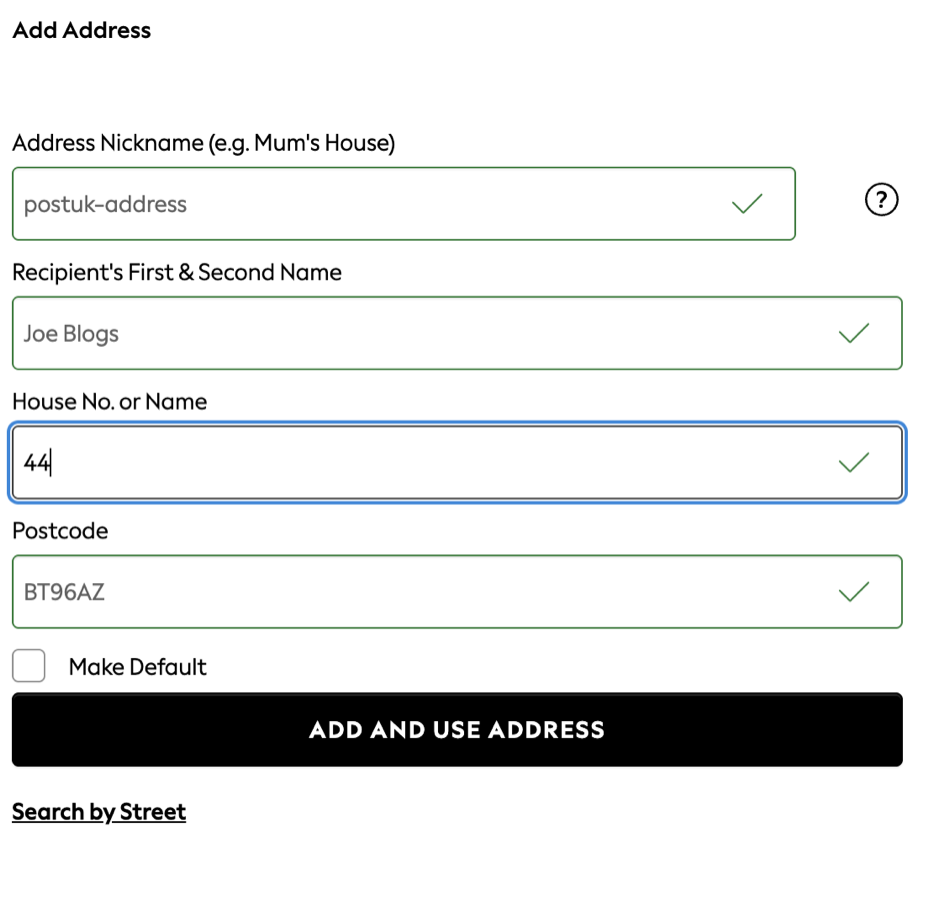
- Pick the building from the list
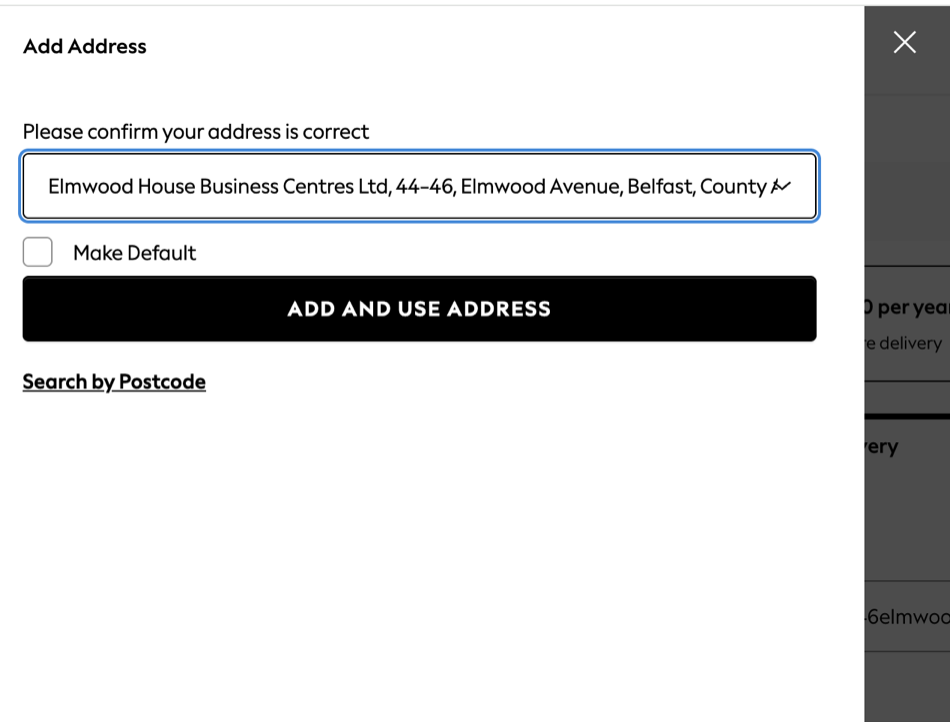
Next asks you to confirm your address and lists the businesses at 44–46 Elmwood Avenue. Choose Elmwood House Business Centres Ltd — that's our building — then Add and Use Address.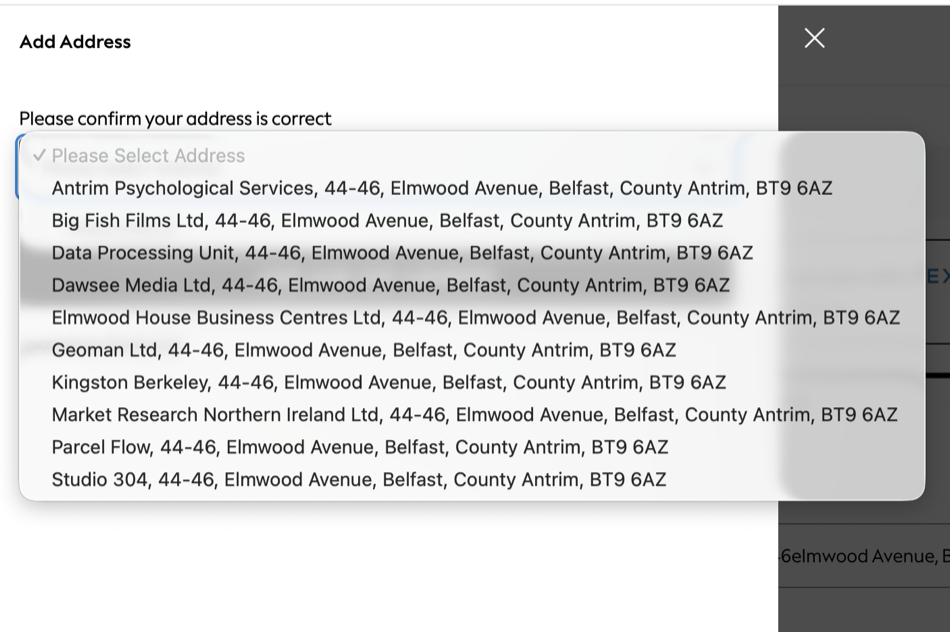
- Click "Edit Address"
Back on the delivery step, your address shows under Deliver To. Click Edit Address.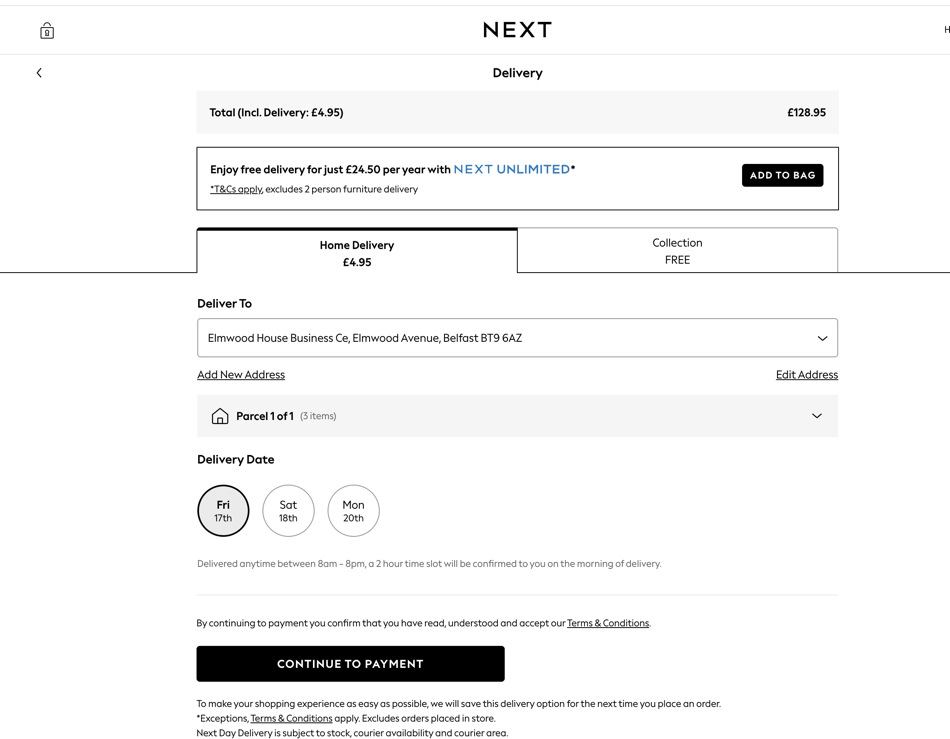
- Add your PostUK suite, then save
In the House No. or Name field, type PostUK Suite 11 (use the suite shown in your PostUK account). Leave your name as the recipient, keep Elmwood Avenue, Belfast and BT9 6AZ, then Save and Use Address.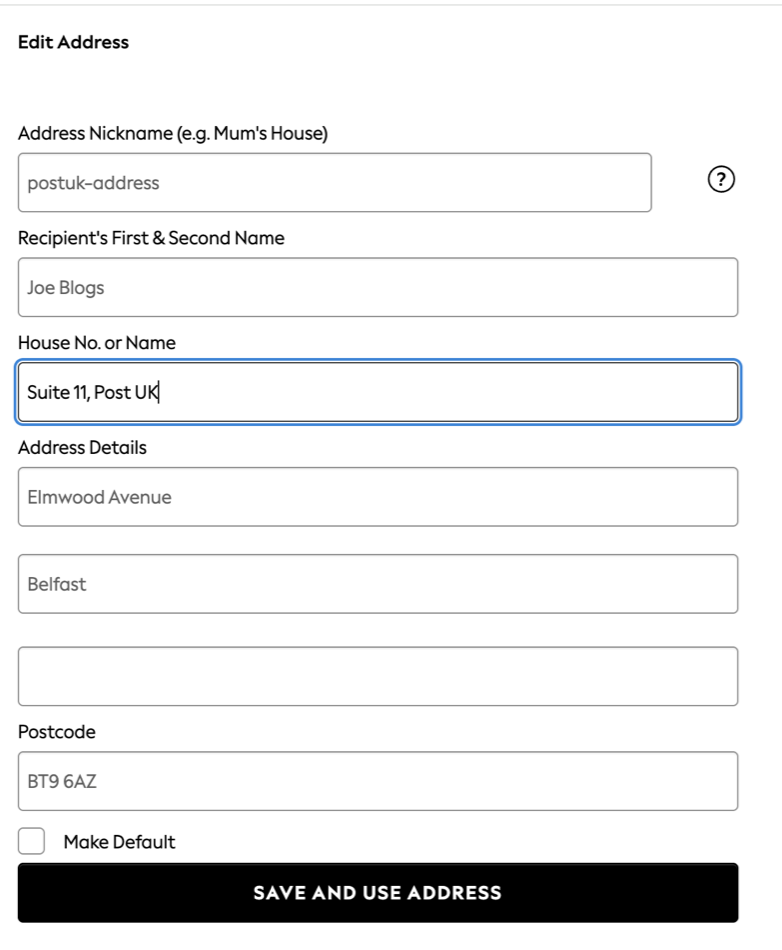
- Order, then tell us
Place your order, then add the Next tracking number to your PostUK account and we'll watch for it arriving.
What goes in each field
- Recipient's name — your own full name
- House No. or Name — PostUK Suite 11 (the suite shown in your account)
- Address details — Elmwood Avenue
- City / Town — Belfast
- Postcode — BT9 6AZ
Next autofilled a different company — is that a problem?
No. Next's finder lists businesses registered at BT9 6AZ, so it might show a name you don't recognise (a "Data Processing Centre" or a neighbouring company). Delivery is driven by the street address and postcode, not the company label. As long as the parcel goes to 44–46 Elmwood Avenue, Belfast BT9 6AZ with your name and PostUK Suite 11 on it, it reaches our depot and lands in your account.
For the cleanest result, choose Elmwood House Business Centre from the list rather than another company — but if you've already ordered with a different business name selected, don't worry, just make sure your name and suite are on it and we'll match it to you.
"Next is asking for my card details" — is that normal?
Yes. When you add a new delivery address, Next runs a one-time security check: you enter a card registered to your own billing address so they can confirm you're a genuine cardholder. It checks your card against your billing address — it does not require your delivery address to match. You can still have parcels delivered to your PostUK address; that's exactly what an alternative delivery address is for.
A couple of things worth knowing before you order:
- Add and select it before you pay. Next can't change the delivery address once an order is placed, so choose your PostUK address at checkout.
- You can save up to five addresses in My Account → Delivery Address, or add one at the checkout stage.
See Next's own guidance: adding an alternative delivery address.
✅ Usually nothing to pay on delivery
Once your Next order reaches us, we forward it from Northern Ireland — inside the EU single market for goods — so it usually arrives in Ireland or the EU with no customs charge and nothing to pay on delivery, unlike parcels sent from mainland Britain. Any customs duty or VAT that does apply is the recipient's responsibility.
How we skip EU customs ›FAQ
Why won't Next accept my PostUK address?
Next's checkout uses an automatic address finder that wants a house number and postcode, then makes you pick a business from a list — and "PostUK" isn't listed, because we're a mailroom inside the building. The fix is to add the address by postcode (House No. 44, postcode BT9 6AZ), choose Elmwood House Business Centres Ltd from the list, then edit the address to put PostUK Suite 11 in the House No. or Name field.
Next autofilled a different company at that postcode — will my parcel still arrive?
Yes. Next lists the businesses registered at BT9 6AZ, so it may show a name like "Data Processing Centre". Delivery follows the street address and postcode, not the company label. As long as the parcel goes to 44–46 Elmwood Avenue, Belfast BT9 6AZ with your name and PostUK Suite 11 on it, it reaches our depot and is logged to your account.
Next is asking for my card details to add the address — is that safe?
Yes. Adding a new delivery address triggers a standard one-time check: you enter a card registered to your own billing address so Next can confirm you're a genuine cardholder. It verifies your card against your billing address — it does not require your delivery address to match. You can still have parcels delivered to your PostUK address.
Can I change the delivery address after I've ordered?
No. On Next you must select your PostUK delivery address at the time of placing the order — once an order is placed the delivery address can't be changed. You can save up to five addresses in My Account, so add your PostUK address before you check out.
Will I pay customs or import VAT when it's forwarded to Ireland or Europe?
Usually not. PostUK forwards from Northern Ireland, inside the EU single market for goods, so your parcel usually reaches Ireland and the EU without the customs charges or handling fees that hit parcels sent from mainland Britain — usually nothing to pay on delivery. Any customs duty or VAT that does apply is the recipient's responsibility.
Ready to order from Next?
Get your free UK delivery address, then use the steps above at the Next checkout.